How To Choose PS3 Accessories?
As the players become increasingly demanding on the video game, PS3 as a next-generation performance in the great war and the most powerful game console by many senior players of all ages. PS3 accessories an extensive and powerful, in the purchase when the need to pay attention to? Also what should be optional accessories for it?

First, the price is too low have a problem. Go big game before you buy, the average price of a local forum to ask, and then to a street game (Beijing's Drum Tower, Xidan) or large-scale electronic markets (Beijing, Ding Hao, e world, etc.) around. Many ask, more places. If there is a reported price than other homes much lower, you have to be careful, do not suffer a great deal to Zhanxiaopianyi. Beijing is now basically offer here at 3400 yuan (60G Hong Kong version).
Second, to see whether PlayStation 3 Accessories is a checkmark in the. Check mark means packaging said the serial number printed on the machine serial number and consistency, not only to the first line but to both banks unanimously agreed Caixing. But the well-known reasons, the host and the parallel is to separate the transport packaging, that the number of machines is running out, and even some JS that must add money to sit in the black ah.
Third, look at packaging. Packaging must be intact, clean, hard to imagine a break in the box what PS3 will be broke, even if the injury might have been ill but did not see it (such as the strong shaking will damage the hard disk, resulting in bad sectors.)
Fourth, open the package check accessories. First look at parts are complete, should include a wireless controller, an AV cable, a cable, a USB controller charging cable, a power cord, a manual, a warranty card. So parts should be available, and packaging intact. Particular attention to all key wireless controller is sensitive to whether there are traces of grease and other used.
Fifth, to see whether the host look good. The appearance of the PS3 work with piano style, as long as the finger touch will leave marks, and very smooth finish, one stroke will scratch hard objects. Particular reader (60G version) and the entrance drive, as long as the appearance of a good finish can be said is basically a new machine, because there is no PS3 that JS can repair the paint scratches.

Sixth, the power to see if the first boot screen. PS3 not used when the first boot is a boot screen, need to match the handle, and set some parameters.How to choose the PS3 accessories. Select which version you buy a good PS3 console, you need to select some parts, the current host of accessories less PS3, so players will be very easy to pick up. The name of the PS3 controller "Sixaxis" motion-sensing system in addition to increasing and wireless functions, also increased exhaled central handle the main menu of the "PlayStation" button, L2/R2 the key touch longer distance, the tilt angle of the analog joystick expanded substantially in the operational improvements carried out. Using the included USB cable and the PS3 is connected to the host can be charged. Bluetooth wireless communication technology can be the biggest entertainment at the same time 7.
The Important Features Of Android Tablet
Through iPad has been successful in captivating the minds and souls of millions of people from around the world. As a matter of fact, more and more people are trend to choose Android Tablet PC, because it is open sourced, and publicly maintained and largely adopted by the smart phones. Now what are the important features of Android tablet PC? Why you should choose Android tablet PC? I have listed the important features below starting from the most important to least.
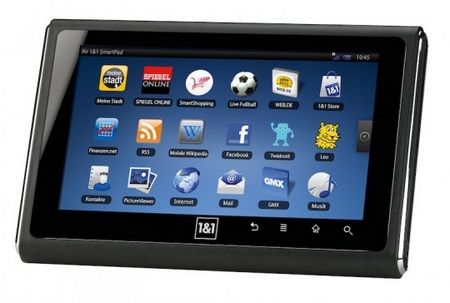
The heart of the any computing device. Lower end tablets install 600 MHz processor, but it is important to select a device with at least 1 GHz processor or you will experience noticeable delay. CortexA8 1GHz and NVIDIA's Tegra 1GHz are the popular 1GHz processors.
2. Display Size and ResolutionPopular display sizes are 7 inch and 10 inch. It is mainly depend on your requirement. If you would like to use the table as quick web surfing device only at home and would like a large screen, you would definitely prefer 10 inch tablet PC. But if you want to bring your tablet around everywhere and enjoy, then you would definitely want to get 7 inch tablet PC.
3. Operating SystemAndroid 2.2 is the latest popular version and you want to look for it. It is known to be faster than previous versions and any other lower versions are not recommended. Also many people anticipate the latest version 3.0 codenamed Honeycomb, but there is no device available yet. It is known to be more adapted to the tablet PC. You know, Android was originally developed to be used with smaller sized smart phones. If you prefer Windows OS based tablet PC, you should be prepare to spend few hundred dollars more because Windows OS requires higher computing power and the expensive OS license fee too.
4. RAM, Storage, and SD slotRAM memory size should around 512MB is good, but higher end devices come with 1GB memory. Default storage varies from 2GB to 32 GB or more. But usually they come with external SD card slots that supports up to 32GB So you want to make sure they have SD card slot.
5. Internet 3G and Wi-FiThis requirement is also depend on how you want to use your tablet. If you want to keep your tablet PC with you all the time, you would probably want to buy 3G supported version. But you need to spend few hundred dollars more in the 3G supported version. Some of tablet PC planned to be announced later in 2011 will have the blazing 4G such as Motorola Xoom. You can still bring around your Wi-Fi only version tablet PC and enjoy the Internet at various places since many public libraries, book stores, coffee shops, and airports provides free public Wi-Fi hotspot services.
6. Camera and Video recordingDoes it have Camera? In rear or front or both? What is the pixel size? At least front camera is necessary, so you can video chat. Also you want to check if it supports 720 HD or Full HD video recording.
7.Touch ScreenCapacitive or Resistive? Capacitive is better over resistive screen, but some prefers resistive. Capacitive screen detects the touch when touched with a electrical conductor such as human body. Resistive screen detects the touch when pressure on the screen is detected. It is more often better to work with fingernails or sharper object such as stylus than finger. Also make sure that it supports multi touch which is required for multi finger zoom in and out.
Want to shop the best Android Tablet? Have a look at this post, I hope this information will help you. And I would like to recommend you a China Wholesale online store which offer various Tablet PCs, visit it please follow the link: http://www.tomtop.com/notebookstablet-pcs
Learn More About Nintendo Wii Remote
Nintendo’s new small, stylish controller is designed to follow the standard TV remote control’s ease of use. Really hope that those who don’t like the conventional video game controller will find the Wii remoteis simple and easy to use. There is a tiny device which also called indicator contains some revolutionary technology. Wiimote act as the extension of the player’s arm, indicator measuring movement and tilt, it’s accuracy can achieve pixel-level. Nintendo believe that the controller will change the way people play games

1. The Power Button
The wireless switch of Wii. On the top left, it’s very user-friendly.
2. Steering Wheel
The remote arrow keys of Wiimote are located below the power button.In most games the Wii steering wheel is mainly used for selection. For example, players in a place like “Metroid Prime 3″, players can scan the steering wheel to select a different mask. However, the steering wheel can also directly control the game, especially in the profile when the Wiimote turned the handle when you hold it like that.
3. A Key
The large key is often used as the first Wii game action key. It’s position is above the front middle of the Wiimote, and it’s very suitable for the player’s thumb.
4. Navigation Key
-, + and Home Keys can be used to directly access the Wii’s beautiful user interface. Players may at anytime, even when playing the game, press the Home key will jump to Wii channel system. – and + keys to make the player forward and backward in each menu browsing. They can also select and pause the game as to use.
5. Internal Speaker
Output sound and music in some occasions suggested that the player into the game as a means of experience.
6. 1 and 2 Keys
When playing classic NES games and some racing games, Wii remote need to turn the side, in that time, 1 and 2 keys are the main action buttons.
7. Lever Indicator
These blue lights illustrate how to distinguish one from the four handle. If the first lights, on behalf of the player 1, and so on. When there is power, these lights also used as a second objective, indicating how much battery power is left.
8. B Trigger
Located behind the Wii remote, B trigger as the primary or secondaryaction button, depending on the game. With the index finger or middle finger press this button.
9. Infrared Top
When point to the Wii sensor bar, Wii remote’s infrared pointer to the pixel-level precision control of the game. Because this technology, Wii remote like a FPS for this game must be precisely aimed at a potential revolution in the handle.
10. Special Attachment Interface
Located at the bottom of the Wiimote, the special interface to connect peripheral devices to Wiimote can interact with many accessories. Wii remote and Nunchuk are sold together, which plug into the interface and extends that capabilities of the device. Other Wii accessories,including the classic controller, also connected to this interface.Ancillary equipment to use Wiimote main battery power and wireless capabilities to communicate with the host.
11. Accelerometer, Bluetooth and Battery
Wii remote has a dedicated accelerometer technology to measure the 3D space in a movement, tilt and throwing. In a game like Excite Truck, the player simply turn the Wiimote and twist the handle to turnaround. In Wii Sports baseball, they swing like a baseball bat as the handle. All of the information transmitted via Bluetooth to the host. Meanwhile, the device behind a battery compartment to accommodate two AA alkaline batteries.
To truly understand how Wii revolutionizes gaming, you have to try it for yourself. Quite simply, Wii is for everyone. The ease of use and interactivity of the Wii Remote and Nunchukallows for a unique social gaming experience for the whole family. You don’t just play the Wii, you experience it. Get the very best video game accessories online, visit or paste the link into your browser: http://www.tomtop.com/video-games
Learn More about Wii Accessories
As we all know, If you want to get the most enjoyment out of the Wii games as possibly as you can, you must invest in a very handful of excellent Wii Accessories like the Wii Nunchuck controller or the Wii Wheels. Wii accessories are playing major role in the games. But what many people never consider about, will be the behind the scenes items that can increase the usability tenfold. Here we are going to highlight some of these items and see why you will not have the ability to live without them in which your Wii Equipment are worried.

As consumers will see that both Wii Remote and Wii Nunchuk Controller reflecting dependence on other feeling free to hold each controller in both hands whichever one desires. The Wii accessories ambidextrous design grants matchless accessibility for its consumers so that having great control on gameplays. There are several Wii accessories coming in the market with various unique style and quality. Several brands presently launching their products of Wii accessories in the market withstanding on the needs of its consumers.
Another from the wonderful Wii Equipment may be the Virtual Console along with the Nintendo Points Card. The Virtual Console can be a specialized part from the Wii Shop Channel along with the Nintendo DSi Shop that allows gamers to buy and download video games on-line for your Wii Console. They consist of initially introduced titles on previous consoles and by way of application emulation, may be purchased with points on the Points Card. You buy the original point’s card and after that credit your card with online credit card transactions or by getting the factors at retail stores. The Nintendo Will has a 512mb of internal memory meaning that you can conserve games and downloads the Virtual Console Games described above directly in your console without a memory card. Nonetheless is you’ve got a SanDisk for Wii SD Card, it is possible to conserve backup files and video games for the card. The card is additionally great for getting your photographs onto your Wii or for shifting video games from method to system.
Consumers have reason for purchasing Wii accessories from the market across the globally. Such Wii accessories have productive features like contoured to fit easily in whichever hand for precision gameplay, working in conjunction with Nintendo Wii Remote boasting the same motion-sensing technology, analog stick assists in character movement, ambidextrous nature of the Wii controller permitting both left-handed and right-handed players providing gaming comfort, Nintendo Wii Remote not included, Including Wii Fit Plus game, Wii Balance Board and 4 AA batteries, and lots of specific features. Many Wii accessories available in the market, only the thing is that consumers should purchase right kind of Wii accessories to have the best usage of it.
The Nintendo Wii game console can be more exciting when it is enhanced with the equally stimulating accessories. Get the very best Video Game Accessories online, visit TOMTOP or paste the link into your browser: http://www.tomtop.com/video-games
Hands On With New Xbox 360 Controller
N-Control has just released an updated version of their Avenger, an insane-looking Xbox 360 controller rig. It’s supposed to make gaming a lot easier thanks to its special button extenders. After looking at it for a few moments, you start to realize that this might be a good idea, especially if you play for hours on your Xbox 360. It came out with a new style, a new design and innovative features to the Xbox 360 family console. Lets get down to a quick review of this beautiful system, so we can explorer some of its amazing features.

Apart from the new color scheme, the aforementioned rotaing digital pad is the only real innovation. According to the Xbox product site, it “transforms from a plus to a dis… the new Wireless Controller provides ultimate precision, accuracy, and control.” The D-Pad can be used in two ways. For cardinal directions, gamers use the plus movements: up, down, left, right. For sweeping movements, gamers can use the pad in a “disc” format.
The Xbox 360 S came out with other than a beautiful new exterior, a nice interior as well. The USB slots were extended, now you can count to have 5 amazing USB slots for all your needs, for controllers, battery charging and everything else. Another great exceptional feature was the Wireless Network CARD, which instead of been similar to the same PlayStation 3 wireless network card and its Xbox 360 Wireless network card with a WiFi 802.11a/b/g it came out with a WiFi 802.11b/g/n that “/n” in the end represent all the difference, it is way faster and more stable. Xbox Live players can now count with a supper, way more smooth connection speed, allowing their Xbox live experience to take a different route, this was sure a great change for the games worldwide, it is way faster than PlayStation’s 3 WiFi adapter. Another feature included was an auxiliary port, which helps for extra connections when needed.
We knew about the transforming d-pad, but did you know the analog sticks have changed? They tilt the same, but the shape of the depression on top of them has been tweaked. The old raised bits are gone and the center has a deeper depression. I’m not sure what the consequences will be of the small change, but the new stick did feel comfortable under my thumb. Here is a comparison of the new controller and an older black one, set up so you can compare the right analog stick of the new one to the left of the old one.
While the new controller is getting pretty good marks across the board – it’s worth nothing that we find the recoloring of the A, B, X and Y buttons odd. While the off-grey looks awesome – it’s weird from them to abandon the familiar colors, especially since games often reference them on screen with just the colors. At any rate, the new controller is coming this November for $ 64 in the US and in 2011 for Europe and the rest of the world. More information of Xbox 360 accessories, welcome to visit TOMTOP or paste the link into your browser: http://www.tomtop.com/accessories-for-xbox360-series
What's New About Wii 2 - The Controller with Touch Screen And Joystick
The unique Wii controller was the biggest selling point, its successor may also take long enough effort in the history of electronic games with the upper and lower parts. But having said that, since the development of interactive entertainment, I am afraid there will not be what the shape of the handle and then to frighten the player, and if there is the handle.
Host-specific to Nintendo's new controller, but now they have a lot of sounds have news of the nose has eyes out, of course, a wide variety of imaginary map. Currently the most widely circulated a Wii controller on Wii 2 news that the peripheral will be able to show the independent game with LCD screen, with multi-touch and two modes of operation the analog stick, and even built-in camera.
American Science and Technology Information Kotaku quoted sources from the industry source said, Wii 2 controller design to include a 6.2 inch touch screen and 8 physical buttons, it seems closer to the traditional game controller. However, Nintendo did not intend to use it is said to completely replace the current Wii Remote. the two may correspond to different user groups. One thing is certain: Nintendo hope to continue to play arm to play the game, which means Wii 2 somatosensory will require specialized game controllers, just like the Wii remote control also need to handle and the Classic Controller to play different types of games are the same. However, Kotaku's news sources did not explain what is the new host before the Wii's remote controller, there will be improved or new product launch support.
Wii 2 will become on your TV screen, the screen though Wii 2 handle a new Wii controller sounds far less magical remote control handle, it may not be the year when it was released Wii sensational effect, but 6.2 inch touch-screen design should still attract a lot of people's eyes. Nintendo can do a lot with this screen, for example, when the real-time display the map in the game, bar equipment, props or other game information. With built-in camera, you can also play derived more interesting, such as playing a "zero" this game, you can simply lift the handle to the evil spirits to take pictures, not as in the past used on TV virtual viewfinder. It is not clear that the camera on the handle is on the front or back, of course, does not rule out the same as 3DS and one each on both sides.
As for the touch screen, synchronized to more. Support for touch often means very different gaming experience, NDS has been through a lot of successful cases demonstrate this point. 3DS heavy plate of "The Legend of Zelda: Ocarina of Time 3D" is said to be very dependent on touch operation, and now Nintendo seems to allow players to such a touch screen, screen to watch the game on another screen design is very satisfied with the new handle might make the two separate screens, so your TV into the screen, handle the present screen.
Nintendo does have plans for Wii 2, their next generation console that will “leave your mouth open” according to earlier reports. What features do you think would be awesome in a Wii sequel? Looking for more information about Wii accessories, welcome to visit TOMTOP or paste the link into your browser: http://www.tomtop.com/wholesale-video-games-accessories-for-nintendo-wii-c254